How to Prepare a Bill of Quantities Online: A Step-by-Step Guide
 BoqCalc Team
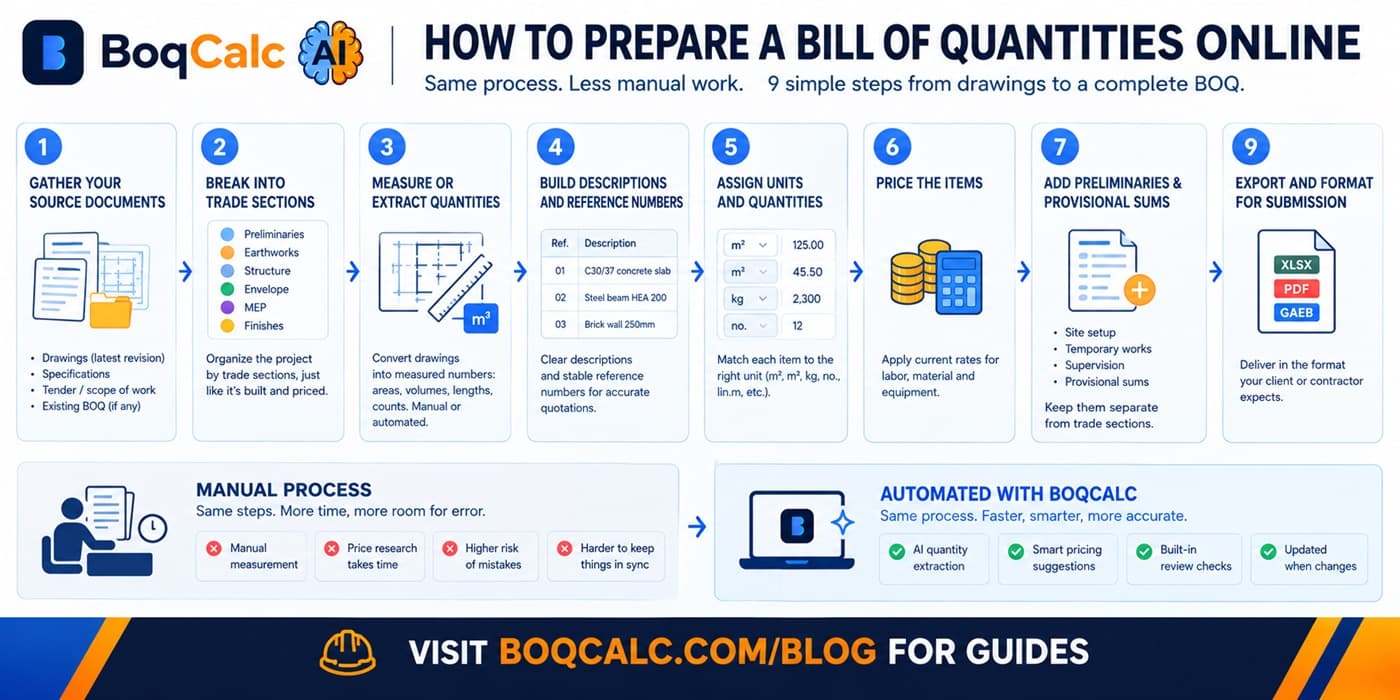
Preparing a Bill of Quantities online doesn't require special software. It requires a clear process. Whether you end up doing every step by hand or automating most of it, the steps themselves don't change. Here's the actual sequence, start to finish.
Step 1: Gather Your Source Documents
Before measuring anything, collect everything that defines the scope:
- Architectural and structural drawings (latest revision, check the date, not just the file name)
- Technical specifications
- Tender documentation or scope of work
- Any existing partial BOQ, if the project has one
Working from an outdated drawing revision is one of the most common (and most expensive) mistakes at this stage: a quantity measured against the wrong version doesn't fail loudly, it just quietly produces a wrong number.
Step 2: Break the Project Into Trade Sections
Rather than working through drawings item by item, split the scope into recognizable trade sections first: preliminaries, earthworks, concrete/structure, envelope, MEP, finishes. This mirrors how the work actually gets built and priced, and it's what keeps a 400-line BOQ navigable later instead of becoming one long undifferentiated list.
Step 3: Measure or Extract Quantities
This is the actual quantity takeoff: converting drawings into measured numbers: areas, volumes, lengths, counts. Done manually, this means working through each drawing sheet with a scale rule or digital measurement tool and recording each measurement by hand. Done with an automated tool, this is the step that gets extracted directly from an uploaded PDF or drawing set.
Either way, the goal is the same: a quantity for every measurable item, in the right unit, traceable back to the drawing it came from.
Step 4: Build Descriptions and Reference Numbers
Every line needs a description specific enough that a supplier or subcontractor could quote against it without calling to ask what you meant, plus a stable reference number that survives later revisions. "Concrete works" isn't a usable line item; "C30/37 reinforced concrete, ground floor slab, 200mm" is. For more on what a complete line actually needs, see our guide to BOQ templates.
Step 5: Assign Units and Quantities
Match each item to the unit the trade actually prices in (m², m³, kg, no., lin.m), not whatever's fastest to type. Inconsistent units are one of the more common reasons a BOQ becomes hard to compare across multiple contractor bids later.
Step 6: Price the Items
Apply a rate to each line: labor, material, and equipment, broken out or combined depending on how granular the pricing needs to be. This is where current, local market pricing actually matters: a rate typed in from a six-month-old quote can be meaningfully wrong by the time the bid goes out.
Step 7: Add Preliminaries and Provisional Sums
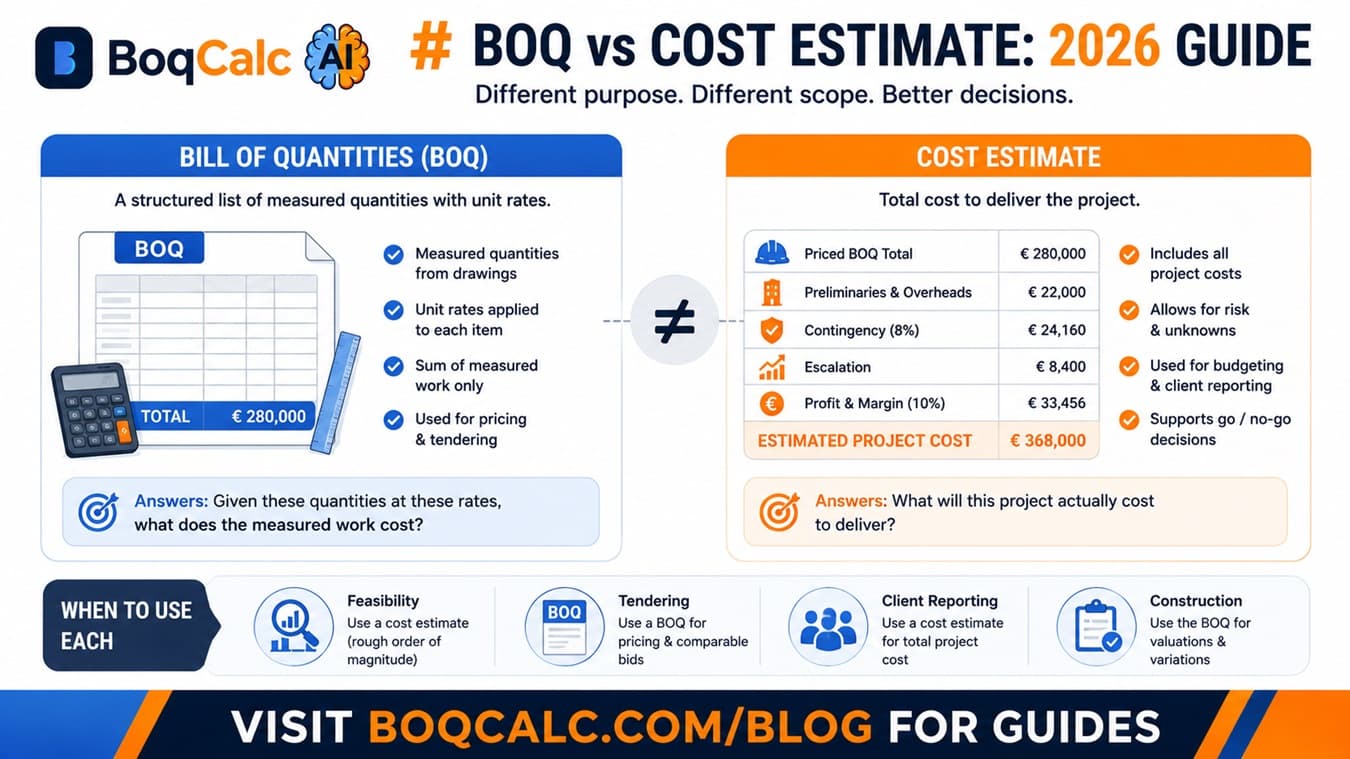
Site setup, temporary works, and supervision costs that aren't tied to a specific trade line still belong in the document, usually as their own section, not folded into individual items. Anything that can't be firmly quantified yet (pending design decisions, uncertain ground conditions) belongs in a clearly separated provisional sums section, not buried inside a trade section where it looks like a firm price. For the difference between a priced BOQ and a full project cost estimate, including where contingency and margin fit in, see BOQ vs cost estimate.
Step 8: Review Before Submission
Before a BOQ goes out, whether to a client for approval or to contractors for pricing, check for:
- Missing or vague specifications that could be misread
- Quantities that don't match the latest drawing revision
- Inconsistent units across similar items
- Provisional sums that got mixed into firm pricing
This review step is exactly where manual processes fall down on larger BOQs: catching a gap in a 600-line document depends entirely on someone noticing, with nothing structural forcing the check.
Step 9: Export and Format for Submission
The final BOQ needs to go out in whatever format the recipient expects: Excel, PDF, or in some markets a structured format like GAEB (see our guide to GAEB files if you're bidding on DACH-region tenders). Formatting inconsistencies at this stage can cause a technically sound bid to get flagged or rejected before anyone reviews the price.
Doing This Manually vs. Automating It
Every step above is legitimate work regardless of how it gets done. What changes with a tool like BoqCalc's AI BOQ generator isn't the process. It's which parts you're doing by hand. Quantity extraction, pricing suggestions, and the missing-specification review happen automatically; you're reviewing and adjusting rather than measuring and typing from scratch.
For a full walkthrough of how that automated version works end to end, see our guide to AI BOQ estimation.
Frequently Asked Questions
Do I need special software to prepare a BOQ? No. A spreadsheet is enough for a small, simple project. The process above works either way; software changes how much of it is manual, not what the steps are.
What's the most common mistake when preparing a BOQ online? Working from an outdated drawing revision. It doesn't produce an obviously wrong number. It produces a plausible-looking one that's actually measured against the wrong scope.
How long should preparing a BOQ take? For a medium project measured manually, 10-30 hours is typical. Most of that time goes to quantity extraction and price-hunting, not the parts that require real judgment.
Should provisional sums be included in the total? Yes, but flagged separately from firm pricing: burying them inside a trade section is how contingency quietly gets forgotten.
Conclusion
A Bill of Quantities is built the same way whether it takes a day or a week: gather the documents, measure accurately, describe items clearly, price with current data, and review before it goes out. The steps don't change. What changes is how much of that work you're still doing by hand.
BoqCalc Team
From the BoqCalc team
Ready to price your next BOQ?
4 free credits, no credit card. Upload a BOQ and see the cost estimate, risk analysis, schedule, and cash flow for yourself.
Try BoqCalc free →